


Compare a wide range of the most popular Eufy security cameras — including the eufyCam 3C, SoloCam S220, eufyCam S330, Indoor Cam P24, S3 Pro and Doorbell E340. Discover which model fits your home, how easy each one is to set up, and the key differences in resolution, app support, and smart features. Read before you buy to find the perfect Eufy camera in 2025!
*As an Amazon Associate I earn from qualifying purchases.*
Eufy makes a lot of cameras, and their names can be confusing if you’re trying to pick one. This post covers popular models, what each is best for, whether it’s indoor or outdoor, picture resolution, whether it uses the Eufy Security app or needs a HomeBase/hub, how far you can expect clear video/recognisable detail, and how easy they are to set up (with step-by-step basics).
Quick pick!
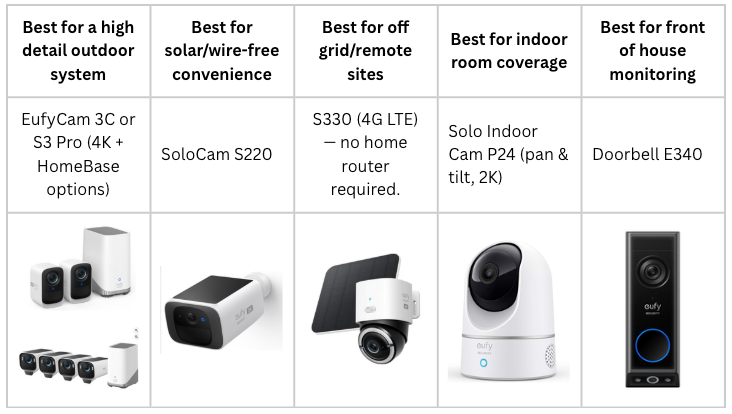
For more in depth info, keep reading!
Setup tips that apply to all Eufy cameras
- Use 2.4 GHz Wi-Fi (many Eufy cameras require 2.4 GHz for pairing; check the manual). If camera supports 5 GHz or 4G, those are usually alternative modes.
- Place within recommended range of HomeBase or router; walls and interference reduce signal. HomeBase extends range and enables local storage/AI features.
- Set detection zones & sensitivity after mounting to reduce false alerts (app options).
- Consider local storage (HomeBase HDD or microSD) if you want no-subscription local recording — Eufy emphasises local privacy options.
EufyCam 3C — 2-Cam Kit (S300 / 3C)
- Type: Outdoor (wireless) — sold as a kit with HomeBase 3 (hub).
- Resolution: 4K (Ultra HD). 4K detail, useful for license plates and fine detail.
- App / Hub: Uses the Eufy Security app and pairs with HomeBase 3 (included in kit) for local storage and advanced features; local storage expandable by microSD
- Range / clarity: 4K lets you read license plates at several meters, excellent daylight detail plus night clarity that benefits from colour/spotlight features if included in the kit.
- Ease of setup / How to set up (basic):
- Charge camera / mount solar panel (if supplied) and place camera within HomeBase range (follow included guidance).
- Plug in HomeBase 3, open Eufy Security app, create/sign in to account.
- In app: Add device → select eufyCam 3C → follow on-screen pairing (scan QR or press sync on HomeBase).
- Mount camera, adjust angle, set detection zones and storage settings in app.
– mounting for this kit offers 2 options, magnetic mount for indoor or covered area use, and screw mounts for more permanent and exposed mounting. The magnetic mount only requires one screw, and the camera magnetically connects to the magnetic mount. The screw mount requires 2 screws and wall plugs to instal, then the camera screws onto a threaded call joint to secure the camera to the mount.
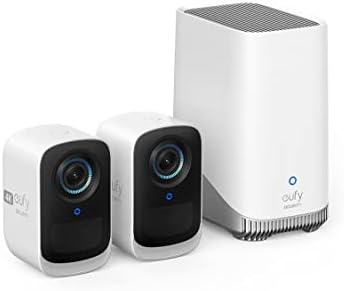
- “Crystal-Clear Surveillance: Experience 4K Ultra HD clarity with advanced Starlight sensors and razor-sharp detail acros…
- “Marathon Power Performance: Remarkable 180-day battery life on a single charge with wireless home security, ensuring ro…
- AI Face Recognition: BionicMind learns family from strangers; a security camera with face recognition that brings precis…
SoloCam S220 (solar SoloCam)
- Type: Outdoor — wire-free solar camera. Can be sold individually or in multi-cam kits (some bundles include HomeBase). This camera doesn’t need a HomeBase as it can function connected to a 2.4GHz wifi signal and record/alert via the eufy security app, but i can be connected to a HomeBase if you have one.
- Resolution: 2K, Good balance of detail and doesn’t use too much internet or storage space.
- App / Hub: Works with the Eufy Security app. Some kits include HomeBase 3 for local storage but the SoloCam S220 is designed to be used wire-free with direct Wi-Fi.
- Range / clarity: 2K gives solid detail for faces and close-to-mid-range objects. Night vision is supported wth infrared images + aperture (sensitive camera sensor to detect motion) for improved low-light security. Solar charging aims to keep the camera continuously powered with sufficient sunlight. Reliable detection tens of metres for motion detection and clear identification at closer ranges.
- Ease of setup / How to set up (basic):
- Mount the solar panel/camera in a place with good sun exposure.
- Turn on camera, open Eufy Security app → Add Device → SoloCam S220 → follow Wi-Fi pairing (2.4 GHz required).
- Position and tighten mount; test live view and set sensitivity/zone.

- eufy Security SoloCam S220, Solar Security Camera, Wireless Outdoor Camera, Continuous Power, 2K Resolution, Wireless, 2…
- Day and Night Clarity: Infrared LEDs and an f/1.6 aperture allow more to be seen for excellent night vision.
- Easy Installation: Put it anywhere thanks to its tiny size and wire-free design. Drill one hole, once.
EufyCam S330 (4G LTE Cam S330)
- Type: Outdoor (4G LTE + Wi-Fi hybrid camera). The S330 is often sold individually or as bundles.
- Resolution: 4K UHD
- App / Hub: Works with Eufy Security app. It supports 4G LTE connectivity (SIM) plus Wi-Fi fallback which are useful if you on’t have reliable Wi-Fi.
- Range / clarity: 4K image quality + AI tracking for human/vehicle offers strong long-range detail and recognition. Because of 4G mode, you can place it further from your router. Battery life and data usage will depend on settings.
- Ease of setup / How to set up (basic):
- Insert SIM (if using 4G) or configure Wi-Fi mode.
- Power camera (battery/solar options depending on kit) and open the Eufy app.
- Add Device → select S330 → follow pairing prompts; if using 4G, follow carrier/SIM guidance in the manual.
Setup is slightly more involved than a Wi-Fi-only camera because you may need a SIM/data plan and to consider data limits; otherwise pairing through the app is straightforward.
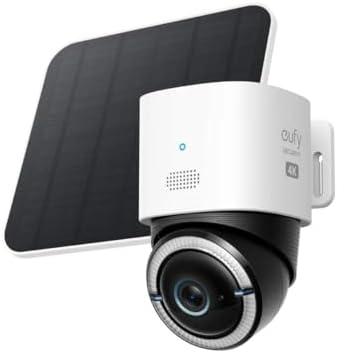
- Forever Power: Empower your viewing to go anywhere you desire. Enjoy off-the-grid freedom with the upgraded solar panel …
- Seamless Connectivity with 4G and Wi-Fi: The Dual-Mode technology of eufy 4G LTE Cam S330 Ultimates security with uninte…
- Stay Connected, Stay Secure: eufy 4G LTE Cam S330 comes with a versatile 3-in-1 SIM card that seamlessly aligns with mos…
Solo Indoor Cam P24 (Indoor Pan & Tilt)
- Type: Indoor — Pan & Tilt Wi-Fi camera. (Often called Solo IndoorCam P24 / Indoor Cam 2K Pan & Tilt).
- Resolution: 2K / 4MP, Good for clear room-level detail
- App / Hub: Connects directly to the Eufy Security app via Wi-Fi (no HomeBase required). Local storage options and app features are available.
- Range / clarity: Night vision typically to ~10m. The pan & tilt camera gives wide coverage (360° horizontal / high tilt range), so you can track movement across an entire room without multiple cameras.
- Ease of setup / How to set up (basic):
- Plug P24 into power (it’s a wired indoor camera).
- Open Eufy Security app → Add Device → Solo Indoor Cam P24 → follow Wi-Fi pairing.
- Place on shelf or mount on wall/ceiling, then use pan/tilt controls in the app to set patrols and privacy modes.
Very easy — plug, pair, and position. Good for monitoring rooms, nurseries, living areas
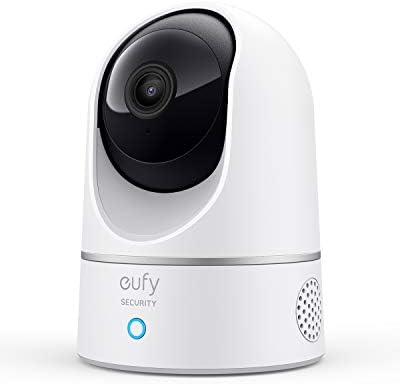
- Relevant Recordings: The on-device AI determines whether a human or pet is present and only records when an event of int…
- The Key is in the Detail: View every event in up to 2K clarity (1080P while using HomeKit) so you see exactly what is ha…
- Smart Integration: Connect your IndoorCam to Apple HomeKit (download our HomeKit User guide in the product information s…
EufyCam S3 Pro — 4-Cam Kit
- Type: Outdoor — wireless cameras often bundled with HomeBase 3 (local storage hub) good for long-life power and advanced low-light/MaxColor tech.
- Resolution: 4K (vendor emphasises 4K + MaxColor Vision for vivid low-light images)
- App / Hub: Requires/works with HomeBase 3 for local storage and advanced AI; controlled through Eufy Security app.
- Range / clarity: 4K with MaxColor Vision aims to provide “day-like” clarity in very low light.
- Ease of setup / How to set up (basic):
- Install HomeBase 3 and connect to router.
- Charge/fit solar panels if included, place cameras within HomeBase range.
- App: Add Device → eufyCam S3 Pro → follow pairing and storage setup (expand HDD if desired).
Setup is moderate — similar to other HomeBase kits, with more steps if you add HDD storage (hard drive storage) or solar installation.

- Nighttime That’s as Bright as Day: Harness the power of a 4K camera combined with MaxColor Vision technology. eufyCam S3…
- Reliable Solar Power System: Experience peace of mind year-round with continuous, reliable security powered by SolarPlus…
- Radar-Powered Detection Alerts Only What Matters: The dual motion detection system, combining radar and passive infrared…
Eufy Security Doorbell E340 (Video Doorbell)
- Type: Doorbell — wall-mounted front-door camera with dual-camera design (some region/variants labelled E340). It supports wired power (or uses the quick-release battery pack where offered)
- Resolution: Main camera 2K (2048×1536) plus a second 1080p lens for additional angle/zoom. HDR (high dynamic range which means it can show very bright areas and very dark areas clearly in the same picture) and colour night vision are highlighted.
- App / Hub: Works with the Eufy Security app and can operate without HomeBase (on-device storage available — e.g., 8GB eMMC plus expandable microSD)
- Range / clarity: night vision ranges and features like package detection, face/ human detection. Eufy lists specific short-range recognitions (e.g., face/plate clarity quoted at vendor distances such as ~5–15ft depending on lens/zoom) — ideal for door-range ID and package monitoring.

- TWO CAMERAS, DOUBLE SECURITY: Two cameras complement each other for an extended view. The front camera focuses on people…
- SAFETY IN COLOUR, EVEN AT NIGHT: We bring light into the dark with our industry-unique dual light system. With an advanc…
- RECOGNIZE THE ESSENTIAL IN 2K FHD SHARP: With crisp 2K resolution, you’ll never miss any detail. Get crystal clear image…